
Ever sent a message and instantly regretted that the other person can see when you read theirs? 😅 If you’re using iPhone 12, 13, 14, 15, 16, or 17, this guide will show you exactly how to turn off read receipts iPhone — for everyone or just one person.
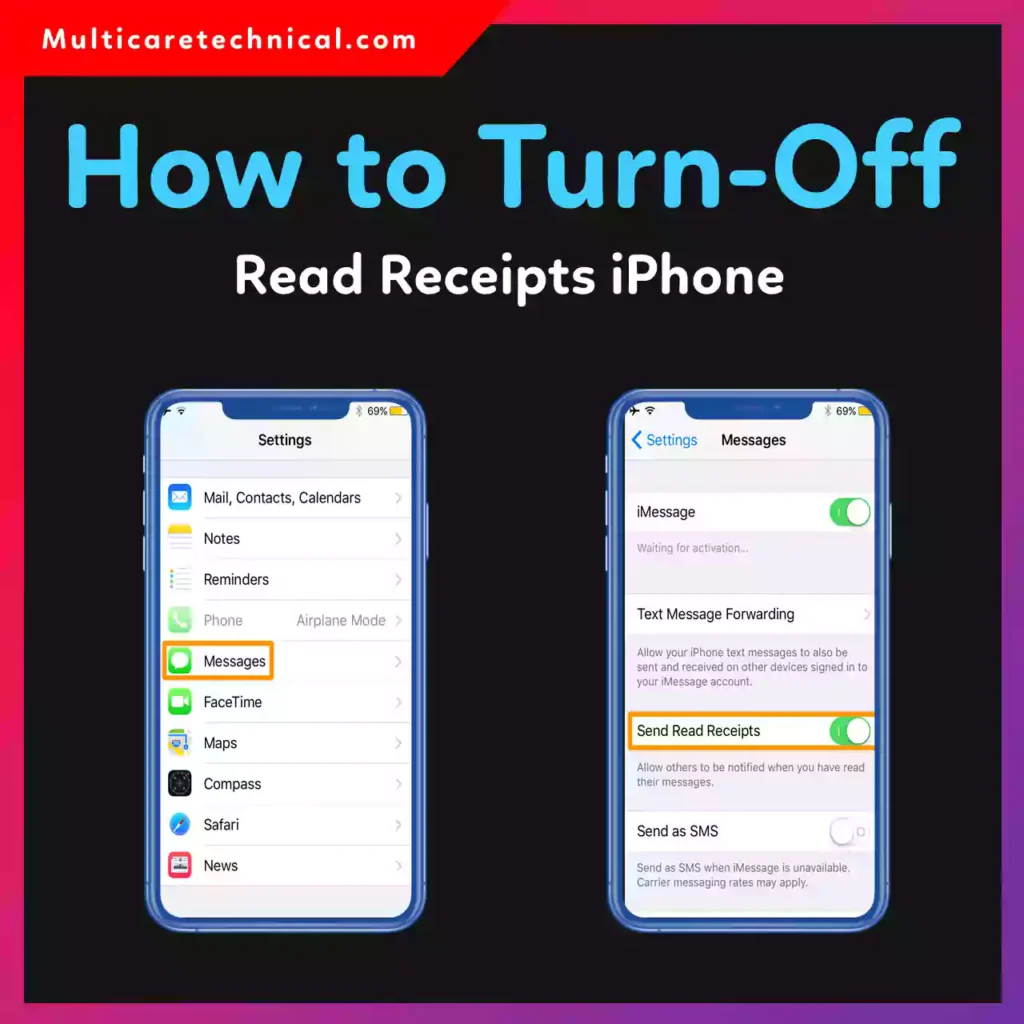
This works on the latest version of iOS and applies to the iPhone 12, iPhone 13, iPhone 14, iPhone 15, iPhone 16, and iPhone 17.
Let’s keep your privacy in your control.
🔥 Quick Answer (Featured Snippet Ready)
To turn off read receipts on iPhone 12–17:
- Open Settings
- Tap Messages
- Turn off Send Read Receipts
That’s it. No one will see when you read their messages.
To turn it off for one person only:
- Open Messages
- Open the conversation
- Tap the contact name at the top
- Tap Info
- Toggle off Send Read Receipts
📱 What Are Read Receipts on iPhone?
Read receipts are a feature inside Apple’s iMessage that lets others see when you’ve opened their message.
When enabled, they’ll see:
“Read Today at 2:45 PM”
If disabled, they’ll only see:
“Delivered”
Simple difference. Big privacy impact.
✅ How to Turn Off Read Receipts iPhone (All Contacts)
If you want to disable it for everyone:
Step-by-Step:
- Open Settings
- Scroll down and tap Messages
- Find Send Read Receipts
- Toggle it OFF (gray)
Now nobody can see when you read their messages.
💡 This works for all iPhones from 12 through 17 running the latest iOS.
👤 How to Turn Off Read Receipts iPhone for One Person
Want privacy from just one contact? Apple lets you control that individually.
Steps:
- Open Messages
- Tap the specific conversation
- Tap the person’s name at the top
- Tap Info
- Turn off Send Read Receipts
That’s it.
Now only that person won’t see when you read their messages.
This answers the common question:
“how to turn off read receipts iphone for one person”
🤫 How to Turn Off Read Receipts iPhone Without Opening Message
Many users search:
“how to turn off read receipts iphone without opening message”
Here’s the truth:
You must turn off read receipts before opening the message. Once opened while read receipts are enabled, it’s already marked as read.
Workaround:
- Turn off read receipts in Settings
- Then open the message safely
Or preview the message using:
- Lock screen notification
- Long press conversation (without fully opening)
⚠️ Important Things to Know
- This only works for iMessage (blue bubbles)
- It does NOT affect SMS (green bubbles)
- The other person can still see “Delivered”
- You can turn it back on anytime
If you’re managing other privacy settings, you might also like:
- How to access hidden apps on iPhone 11–16:
https://multicaretechnical.com/how-to-access-hidden-apps-on-iphone-11-to-16-complete-2026-guide - How to access screenshots on Mac & MacBook:
https://multicaretechnical.com/how-to-access-screenshots-on-mac-macbook-air-pro-2026-guide - How to access emojis on Chromebook 😊:
https://multicaretechnical.com/how-to-access-emojis-on-chromebook-%f0%9f%98%8a-quick-easy-2026-guide
💬 Why People Turn Off Read Receipts
Here’s why many iPhone users disable them:
- More privacy
- Less pressure to reply instantly
- Avoid awkward situations
- Better control over conversations
- Professional boundaries
In 2026, digital boundaries matter more than ever.
🧠 Pro Tip for Extra Privacy
If you want maximum control:
- Disable Read Receipts
- Disable Typing Indicators
- Use Focus Mode
- Preview messages without opening
This keeps your communication stress-free.
📌 Quick Summary
If you’re using iPhone 12–17, turning off read receipts takes less than 10 seconds.
You can:
- Disable for everyone
- Disable for one person
- Prevent accidental “Read” notifications
Privacy = Power.
❓ FAQ (Optimized for AI Overviews & Featured Snippets)
1. How do I turn off read receipts on iPhone 12–17?
Go to Settings → Messages → Turn off Send Read Receipts.
2. Can I turn off read receipts for one person only?
Yes. Open the conversation → Tap name → Info → Toggle off Send Read Receipts.
3. Does turning off read receipts affect SMS messages?
No. It only works for iMessage (blue bubbles).
4. How to turn off read receipts iPhone without opening message?
Disable read receipts in Settings before opening the message.
5. Can someone know if I turned off read receipts?
No notification is sent when you disable it.